
Mobiles
Essential Tips for Maintaining Your Mobile Phone
Aug
Essential Tips for Cleaning and Maintaining Mobile Phones
Maintaining your mobile phone is crucial for extending its lifespan and ensuring optimal performance. Regular cleaning and proper care can prevent damage and enhance functionality. Here are some essential tips to help you keep your device in top shape.
Effective Cleaning Techniques
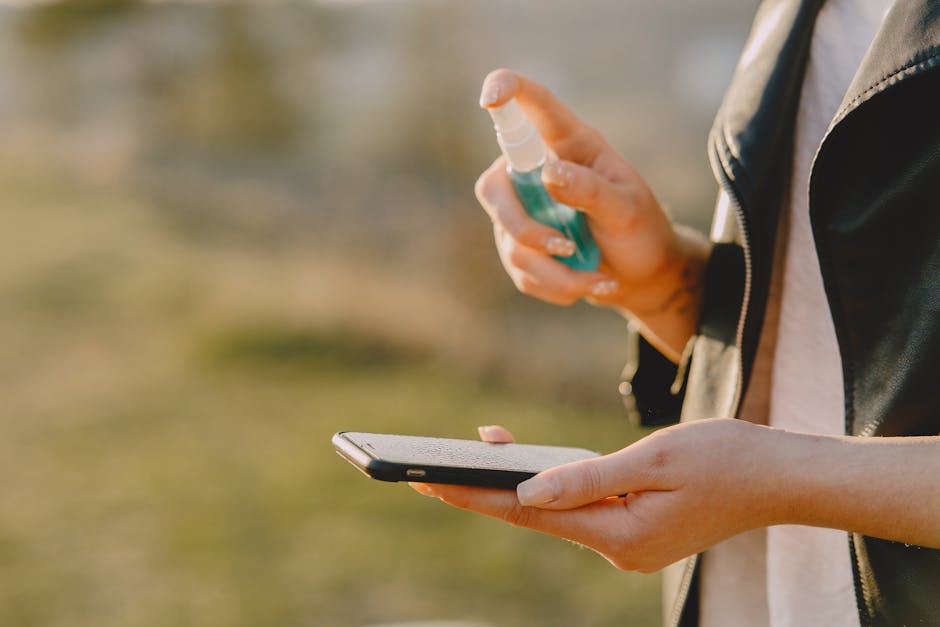
Start with the screen, which can accumulate smudges and fingerprints. Use a microfiber cloth, which is soft and non-abrasive, to gently wipe the screen. Avoid using paper towels or rough fabrics, as they can scratch the glass. For a deeper clean, slightly dampen the cloth with a mixture of water and isopropyl alcohol (70% or less) to eliminate bacteria without harming your device.
Don’t forget about the phone’s ports and buttons. Use a soft brush or a can of compressed air to remove dust and debris from charging ports and speaker grills. This prevents dirt from affecting the phone’s functionality.
Regular Maintenance Practices
In addition to physical cleaning, software maintenance is equally important. Regularly update your phone’s operating system and apps. These updates often include security patches and performance improvements that can prevent glitches and enhance usability.
It’s also wise to back up your data regularly. Use cloud services or external storage to keep your important files secure. This way, even if your device experiences issues, you won’t lose crucial information.
Safety During Cleaning
While cleaning your phone, it’s essential to power it down to prevent any accidental inputs or damage. Avoid exposing your device to extreme temperatures or direct sunlight during the cleaning process, as this can damage internal components. Ensure that no liquid enters the device, especially around the ports and speakers, which can cause electrical issues.
Common Mistakes in Mobile Phone Care and How to Avoid Them
Understanding common mistakes can significantly improve your mobile phone care routine. Here are a few pitfalls to avoid:
Over-Cleaning
It’s easy to think that more cleaning is better, but over-cleaning can lead to wear and tear. Avoid using abrasive cleaners or scrubbing too hard, which can damage the screen or casing. Establish a regular cleaning schedule—perhaps once a week for the screen and monthly for deeper cleaning.
Using Wrong Cleaning Products
Many people mistakenly use household cleaners or alcohol-based solutions that are not suitable for electronic devices. Always stick to products designed specifically for electronics. Before using any cleaning solution, check the manufacturer’s recommendations to ensure compatibility with your device.
Neglecting Software Updates
Failing to update your software can lead to security vulnerabilities and performance issues. Set your phone to update automatically, or check for updates regularly to keep your device running smoothly. This is especially crucial for apps that manage your phone’s performance and security.
By avoiding these common mistakes, you can enhance your phone’s lifespan and performance, ultimately saving you money on repairs or replacements. Proper care will not only keep your phone looking good but also functioning well, giving you a better user experience.
Recommended Accessories for Mobile Phone Maintenance
Investing in the right accessories can significantly enhance your mobile phone’s longevity and performance. Below are some essential accessories that not only protect your device but also improve its usability.
Screen Protectors
One of the most vulnerable parts of any mobile phone is its screen. A high-quality screen protector can save your device from scratches and cracks, which can lead to costly repairs. There are several types of screen protectors available:
- Tempered Glass Protectors: These offer superior protection against impacts and scratches while maintaining clarity and touch sensitivity.
- Plastic Film Protectors: Generally cheaper, these provide basic protection but may not be as durable as glass options.
- Privacy Screen Protectors: These not only protect your screen but also prevent others from seeing your display at angles, which is helpful in crowded places.
When purchasing a screen protector, make sure to choose one that is compatible with your phone model, and check reviews for clarity and durability.
Phone Cases
A sturdy phone case is essential for protecting your device from drops and impacts. Here are some popular types of cases:
- Rugged Cases: These are designed for maximum protection, ideal for users who are prone to dropping their phones.
- Slim Cases: For those who prefer a sleek design, slim cases offer decent protection without adding much bulk.
- Wallet Cases: These multifunctional cases provide storage for cards and cash, making them convenient for daily use.
Consider factors like material, grip, and style when selecting a case. Popular local brands like Infinix and QMobile often offer tailored options for various models.
Portable Chargers
Keeping your phone charged is crucial, especially if you’re on the go. Portable chargers, or power banks, come in various capacities and features:
- High-Capacity Power Banks: These can charge your phone multiple times and are perfect for long trips.
- Fast Charging Power Banks: If you’re always in a hurry, opt for a power bank that supports fast charging to quickly top off your battery.
- Compact Power Banks: For everyday use, a lightweight power bank that easily fits in your pocket or bag is ideal.
When choosing a power bank, check for compatibility with your phone’s charging standards and read reviews for reliability.
Cleaning Kits
Regular cleaning is vital for maintaining both the aesthetics and functionality of your phone. A good cleaning kit should include:
- Microfiber Cloths: These are gentle on screens and can effectively remove fingerprints and smudges without scratching.
- Screen Cleaning Solution: Look for alcohol-free solutions that are safe for electronics.
- Brushes and Compressed Air: These can help remove dust from ports and tight spaces.
Many local retailers like Metro and Al-Fatah offer cleaning kits specifically designed for mobile devices, making it easy to find high-quality options.
Headphones and Earbuds
Investing in quality headphones or earbuds can enhance your multimedia experience. Look for features like:

- Noise Cancellation: Ideal for blocking outside noise and immersing yourself in music or podcasts.
- Comfortable Fit: Ensure the model you choose is comfortable for extended use, especially if you use them for calls or long listening sessions.
- Wireless Options: Bluetooth headphones offer convenience and freedom from tangled wires.
Brands like Huawei and Samsung offer a range of options that are well-reviewed in local markets. Always check compatibility with your device before purchasing.
Storage Solutions
To prevent your phone from slowing down due to lack of space, consider investing in external storage options:
- MicroSD Cards: For phones that support expandable storage, a high-capacity microSD card can significantly increase your storage space.
- Cloud Storage: Services like Google Drive and Dropbox offer reliable options for backing up photos and files, freeing up space on your device.
Always check for the maximum supported capacity and speed class for microSD cards to ensure optimal performance with your phone.
Car Mounts
If you frequently use your phone for navigation, a sturdy car mount is essential. Look for features like:
- Adjustability: Ensure the mount can hold your phone securely and adjust to your preferred viewing angle.
- Compatibility: Check that the mount fits your phone size and car dashboard.
Local brands and online marketplaces like Daraz offer a variety of options, making it easy to find a reliable car mount suited for your needs.
Backup Battery Cases
For added convenience, a backup battery case combines a protective case with an integrated power source. This allows you to charge your phone on the go without carrying a separate power bank. Look for:
- Battery Capacity: Choose a case that offers enough power to charge your phone fully or at least 50% more.
- Material: Make sure the case is durable to protect your phone from drops.
These cases are especially useful for heavy users who often find themselves running low on battery.
How to Check the Quality of Mobile Accessories Before Purchasing
When it comes to mobile accessories, quality is paramount. With a vast array of products available in the market, especially in online stores like Daraz and Metro, it can be challenging to discern which items are worth investing in. Here are some essential tips to help you evaluate the quality of mobile accessories before making a purchase.
1. Brand Reputation
One of the first indicators of quality is the brand. Established brands often have a reputation to uphold and are more likely to produce reliable products. Look for brands that are well-known in Pakistan, such as Anker, Baseus, and Samsung. Check online reviews and ratings, as well as customer testimonials, to get a sense of the brand’s reliability.
2. Material and Build Quality
The materials used in the accessories play a significant role in their durability and performance. Here are some aspects to consider:
- Phone Cases: Look for cases made from high-quality polycarbonate, TPU (thermoplastic polyurethane), or silicone. These materials provide excellent protection against drops and scratches.
- Cables: Check for reinforced connectors and braided cables, which tend to withstand wear and tear better than standard plastic cables.
- Screen Protectors: Tempered glass protectors are generally more durable than plastic ones, offering better scratch resistance and impact protection.
3. Customer Reviews and Ratings
Before purchasing, always check customer reviews. Look for products that have a high number of positive ratings. Pay attention to comments about durability, functionality, and overall satisfaction. Websites like Daraz often have customer feedback sections where you can see real user experiences. Look for common themes in the reviews—if multiple customers mention the same issue, it’s a red flag.
4. Warranty and Return Policy
A good warranty can be a sign of confidence in the product’s quality. Check if the accessory comes with a warranty and understand what it covers. A reliable return policy is also essential in case the product does not meet your expectations. This is particularly important for electronics, where defects can occur.
5. Packaging and Documentation
High-quality products often come in well-designed packaging that includes proper documentation. If the packaging looks cheap or poorly made, it might be an indication of the product’s quality. Look for:
- Clear labeling with brand and product information.
- Inclusion of user manuals and warranty cards.
- Seals or certifications that denote quality assurance.
6. Compatibility
Ensure that the accessory you are purchasing is compatible with your specific mobile phone model. Many sellers provide compatibility information, but double-checking can save you from buying an unsuitable product. For instance, if you are buying a charging cable, make sure it supports the fast-charging capabilities of your phone.

7. Price vs. Value
While a low price can be tempting, it’s essential to assess whether it reflects a good value. Sometimes, spending a little more on a higher-quality accessory can save you money in the long run by reducing the need for replacements. Compare products of similar features and quality across different platforms like Imtiaz, Al-Fatah, and Naheed to find the best deal.
8. Check for Certifications
Some accessories come with certifications that indicate they meet specific safety and quality standards. Look for certifications like:
- CE Mark: Indicates compliance with health and safety standards in Europe.
- RoHS: Signifies the product is free from hazardous substances.
- UL Certification: Ensures safety and performance standards, especially for electronic devices.
9. Ask for Recommendations
Don’t hesitate to ask friends, family, or online communities for recommendations. Personal experiences can guide you toward quality products that have worked well for others. Engaging with tech forums or social media groups can also provide insights into the best mobile accessories available in Pakistan.
10. Purchase from Reputable Retailers
Always buy from established online platforms or physical stores that have a good reputation. Retailers like Daraz, Metro, and Al-Fatah typically offer a better selection of quality products and customer service. Avoid unknown vendors, especially those offering significantly lower prices, as they might be selling counterfeit or subpar items.
The Impact of Environmental Factors on Mobile Phone Performance
Environmental conditions can significantly affect the performance and longevity of your mobile phone. Understanding these factors can help you take better care of your device and make informed decisions about usage and maintenance.
1. Temperature Extremes
Mobile phones perform best within a specific temperature range. Extreme heat can cause the battery to degrade quickly, while extreme cold can lead to reduced battery life and decreased performance. In Pakistan, where temperatures can soar during summer, avoid leaving your phone in direct sunlight or in a hot car. Similarly, protect your device from frostbite in colder months.
2. Humidity and Moisture
High humidity levels can lead to moisture build-up within the phone, potentially damaging internal components. Always keep your phone away from areas prone to spills or excessive moisture, such as bathrooms or kitchens. Consider using waterproof cases or pouches when engaging in outdoor activities, especially near water sources.
3. Dust and Debris
Dust and dirt can accumulate in ports and buttons, leading to malfunctions. Regularly clean your mobile phone with a soft cloth and ensure that ports are free from debris. Using a dust cover for ports can also prevent build-up in the first place.
4. UV Exposure
Prolonged exposure to UV rays can damage the phone’s screen, causing discoloration and reducing clarity. To mitigate this risk, consider using screen protectors that offer UV protection, and avoid leaving your phone out in the sun for extended periods.
5. Electromagnetic Interference
While modern smartphones are designed to withstand some level of electromagnetic interference, it’s wise to keep them away from strong electromagnetic fields, such as those produced by microwaves or heavy machinery. This can prevent possible disruptions in performance and connectivity.
6. Seasonal Considerations
Pakistan experiences different weather patterns throughout the year, which can impact phone performance. For example, during the monsoon season, increased humidity may lead to issues with moisture. Being mindful of seasonal changes can help you adjust how you protect and maintain your device accordingly.
7. Transportation Conditions
When commuting, ensure that your phone is securely stored in a protective case to avoid damage from bumps or drops. During travel, consider carrying a power bank to keep your phone charged, especially during long journeys where access to power might be limited.
Best Practices for Mobile Phone Storage and Handling
Proper storage and handling of your mobile phone can prolong its life and maintain its functionality. Here are some best practices to keep in mind:
1. Use Protective Cases
Invest in a high-quality protective case that fits your phone snugly. A good case can absorb shocks from drops and prevent scratches. Choose cases that provide sufficient coverage for corners and edges, which are often the most vulnerable areas during impacts.
2. Store in a Safe Place
When not in use, store your phone in a safe, dry place away from direct sunlight and where it won’t be subject to physical stress. Avoid placing it in tight pockets or bags where it can get squished. Instead, use a dedicated pouch or compartment to keep it secure.
3. Avoid Overcharging
While modern smartphones have built-in mechanisms to prevent overcharging, it’s still good practice to unplug your device once it reaches 100%. Overcharging can generate heat, which may degrade the battery over time. Consider charging your phone overnight only if you are using a certified charger.
4. Clean Regularly
Regular cleaning not only keeps your phone looking good but also helps maintain its functionality. Use a microfiber cloth to clean the screen and body, and ensure that ports are free from lint and dust. A small brush or compressed air can help clear debris from charging ports.

5. Manage Apps and Storage
Keep your phone running smoothly by managing apps and storage effectively. Regularly uninstall unused applications and clear cache data to free up space. This helps maintain speed and performance, especially for phones with limited storage capacity.
6. Use Screen Protectors
Applying a screen protector can prevent scratches and cracks, preserving the clarity and functionality of your display. Choose a high-quality tempered glass protector for maximum protection against impacts.
7. Handle with Care
Be mindful of how you handle your phone. Avoid using it while walking or in crowded places where it can easily slip from your hand. Use both hands when taking photos or typing for better grip and stability.
Understanding Warranties and What They Cover Regarding Phone Care
When purchasing a mobile phone or accessories, understanding the warranty can save you from unexpected costs related to repairs or replacements. Here’s what you need to know:
1. Types of Warranties
Most mobile phones come with a manufacturer’s warranty that covers defects in materials and workmanship. Familiarize yourself with the different types of warranties:
- Limited Warranty: Covers specific components for a defined period, usually one year. Check what is included and excluded.
- Extended Warranty: Offers additional coverage beyond the standard warranty, often for a longer period.
- Accidental Damage Protection: Covers damages that occur due to accidents, such as drops or spills, often available for an additional fee.
2. What’s Covered?
Warranties typically cover manufacturing defects, such as:
- Issues with the battery not holding a charge.
- Malfunctions of the screen or buttons.
- Problems with the camera or other hardware components.
Accessories may also have separate warranties, so check individual products for coverage details.
3. What’s Not Covered?
Generally, warranties do not cover:
- Normal wear and tear.
- Accidental damage (unless you have purchased specific coverage).
- Damage caused by unauthorized repairs or modifications.
4. How to Claim Warranty
To claim a warranty, keep the original receipt and follow the manufacturer’s instructions. This often involves:
- Contacting customer service for troubleshooting.
- Sending the device for inspection.
- Providing necessary documentation, like the warranty card and purchase receipt.
5. Local Regulations
In Pakistan, consumer protection laws may influence warranty terms. Familiarize yourself with local regulations to understand your rights regarding repairs and replacements
